Posts mit dem Label Azure werden angezeigt. Alle Posts anzeigen

Dienstag, 20. August 2024

Retrieval-Augmented Generation - The metasearch engine in the age of AI

What is Retrieval Augmented Generation / RAG?

A nice analogy that also makes it clear what RAG is, is the concept of a metasearch engine. Here, the search query is forwarded to several other search engines. The results of all the requested services are then collected, processed and made available to the user. RAG is a technique in which an AI model is combined with other data sources in addition to the data in the LLM (Large Language Model) in order to generate more precise and contextually relevant answers. This is therefore a very similar approach to the metasearch engine. Even the two schematic diagrams of the technologys are similar:
RAG is used in this way in Microsoft 365 Copilot. To extend the capabilities of the AI, information is retrieved from various data sources and integrated into the response generation. This enables Copilot not only to access pre-trained data, but also to use current and specific information from other sources, including the data in the M365 Tenant. Access is via the Microsoft Graph. This also ensures that the underlying permission concept is always respected by the AI.

Copilot in Microsoft 365 uses RAG - this cannot be customized

In Microsoft 365 Copilot, RAG is used to improve responses to user queries. Copilot can access various data sources, such as documents, emails, Teams chats, etc., to provide well-grounded and accurate answers.
This also determines which functions / roles Copilot provides in the respective apps.
Examples:
  • Word: Generate text with and without formatting in new or existing documents.
  • Excel: Suggestions for formulas, chart types and insights for data in Excel sheets.
  • PowerPoint: Create a presentation from a prompt or a Word file.
Complete overview:

Now we have GraphRAG - that can be customized

The article Unlocking LLM discovery on narrative private data describes GraphRAG, a new method from Microsoft Research that extends the capabilities of large language models (LLMs) to access and analyze your data.
GraphRAG combines LLM-generated knowledge graphs with machine learning to improve document analysis performance, for example. This method shows significant improvements in answering complex questions compared to standard approaches.

A key benefit of GraphRAG is its ability to identify and understand topics and concepts in large data sets, even if the data was not previously known to the LLM. Here are some practical use cases for this technology:
  • Information extraction: GraphRAG can be used to extract specific information from large document collections or databases.
  • Content generation: GraphRAG helps to create content that requires in-depth contextual knowledge.
  • Customer support: GraphRAG can improve customer support by accessing a knowledge base and providing accurate answers to customer queries.
  • Knowledge management: In large organizations, GraphRAG can help to make efficient use of existing knowledge by retrieving and consolidating relevant information from different departments and documents.

Quickstart

To get started with the GraphRAG system (https://github.com/microsoft/graphrag), it is recommended to use the Solution Accelerator package (https://github.com/Azure-Samples/graphrag-accelerator). This offers a user-friendly end-to-end solution based on Azure resources, quote: One-click deploy of a Knowledge Graph powered RAG (GraphRAG) in Azure
The graphic shows, for example, the following sources for own solutions and GraphRAG:
  • Azure Blob Storage
  • Cosmos DB
  • Azure OpenAI
  • Azure AI Search / Vectorstore
  • Container Registry
  • Application Insights

As described on GraphRAG's GitHub page, Prompt Tuning options can also be used to customize the solution to your needs and use cases:

Montag, 29. Juli 2024

Google Gemini compared with Microsoft Copilot

The release of ChatGPT by OpenAI at the end of 2022 has re-shuffled the cards on the AI market. Microsoft is the largest investor at OpenAI. OpenAI's technology is therefore also the foundation of Copilot products.

Google is taking a slightly different path. Its own company, Google DeepMind Technologies Limited, has developed the Gemini solution. Google Gemini was originally called Google Bard and is the follow-up to the LLMs LaMDA and PaLM 2.

What is being compared in this test?

Microsoft Copilot

Google Gemini

Copilot in Edge

https://www.bing.com/chat

Google Gemini

https://gemini.google.com/app

Copilot in Microsoft 365 / Microsoft Word

https://www.office.com/chat

Gemini for Google Workspace add-on

https://workspace.google.com/solutions/ai/

Overview

Google Gemini:

Google Gemini is not based on a single model, but on a series of different LLMs. Each of these LLMs has different dimensions and a different mix between efficiency and the ability to find answers.

The official homepage of Gogole Gemini is this one: https://blog.google/technology/ai/google-gemini-ai

Feature availability:
  • Gemini is available as part of the Google Early Access Test Program.
  • The solution is also available via a Gemini for Google Workspace add-on and for users with private accounts via Google One AI Premium.
The Gemini for Google Workspace add-on was used for this comparison.

Microsoft Copilot:

The Copilot solution from Microsoft has a little different architecture. Copilot in Edge, formerly Bing Chat Enterprise, is very similar to Google Gemini. Copilot in Microsoft 365, on the other hand, is integrated into the Microsoft 365 cloud solution and is therefore always part of an M365 subscription. Copilot in Microsoft 365 has access to the data in the tenant via the Graph interface. The permissions model, i.e. who has access to which data within Microsoft 365, is an aspect that is always respected.
In addition, Copilot in Microsoft 365 uses orchestration. Copilot knows from which app the prompt was sent, and this has an impact on the output. For example, Copilot in Word focuses on being a writing assistant, while Copilot in Excel has its benefits in formulas and diagrams. There is no such deep integration in Google Workspace with Gemini.

Comparison

Copilot in Edge (formerly Bing Chat Enterprise) & Google Gemini App

One of the major points of generative AI solutions is that there is only limited transparency about the data used to train the models. For GPT 3 there is this list from OpenAI:
  • Common Crawl -> 60%
  • WebText2 -> 22%
  • Books1 -> 8%
  • Books2 -> 8%
  • Wikipedia -> 3%
Even this is only very high level and for many other models / versions there is not even that. Also for Gemini only this statement could be found: “According to Google's Terms of Service and Privacy Policy, the sources of training data for Google's Gemini AI include publicly available sources and information from Gemini apps. These are used to improve and develop Google's products, services and machine learning technologies.”
The sources on which the LLMs were trained can therefore only be determined to a very limited level and lead to curious / incorrect results over and over again.

Test 1

Prompt: “Who scored the most goals in a soccer match?
The answer focuses purely on men's soccer. It is remarkable that the two apps provide different answers. The very simple prompt is surely also partially the reason for this.
If you ask in the dialog with the prompt: “Which woman scored the most goals?”, the apps provide the following answers:
Findings:
Both apps show similar behavior. The AIs only respond to women's soccer when asked.

Test 2

Prompt: “Can I log in to ChatGPT via Azure authentication?

Findings:
The answers from both apps are not good / misleading. The answer from Gemini is also wrong. In general, you can log in to OpenAI and therefore also to ChatGPT with an Azure account / Entra ID.

However, that was not a good prompt either. (PS: Prompt Engineering: https://platform.openai.com/docs/guides/prompt-engineering đŸ˜Š )
A prompt that would work better would be, for example: “Can I use an account from Azure AD or Entra ID to log in to OpenAI / https://chatgpt.com/auth/login?

Copilot in Word & Google Docs + Gemini for Google Workspace Add-On

Both solutions offer the feature to analyze and summarize texts as well as to create texts.

The “Gemini for Google Workspace Add-On” was used in Google Docs: https://workspace.google.com/u/0/marketplace/app/ai_assist_for_gemini_in_sheets_docs_and/985356259375
Copilot in Microsoft 365” was used in Microsoft Word: https://www.microsoft.com/de-de/microsoft-365/microsoft-copilot

Test 3

Context: Ask me anything about this document

For this comparison, the same Word document (docx) was opened in Microsoft Word and in Google Docs. The document “A quick guide to secure Office 365.docx” describes the possibilities of securing Office 365 and monitoring and controlling access with features such as Defender for Cloud Apps etc.
Copilot in Word welcomes the user with the message “Ask me anything about this document”. The predefined prompt: “Summarize this document” generates a correct result:
Questions to the document such as “What does the document say about multifactor authentication? Should this be used?” are also answered correctly. Copilot generates in addition jump labels to the respective place in the document.
Gemini for Google Workspace Add-On welcomes the user with “Enter prompt here”. The Refine -> Select the text -> Summarize function is available to summarize the document. The result is also correct.
The feature to “chat” with the document and ask questions was only available in the early access test program for Google Workspace Labs at the time of testing (June 2024). Unfortunately, this function could not be tested with the add-on used. Here is an example from Google on how it would look like:
Findings:
The integration and therefore the usability of Copilot in Word is better than the Gemini solution with Google Docs. Example: If you use a Word version that is set to German, for example, Copilot also delivers its summary in German. Gemini does not do this when using exactly the same settings (document in English and Google Docs in German).

Test 4

Context: Describe what you would like to write

When it comes to using the apps as a writing assistant, you are greeted by Copilot in Word with the text “Describe what you would like to write”. Both solutions offer this feature. The following prompt was used for the comparison in both apps: “Write an essay about Dietrich Bonhoeffer. The text should be an overview of his life and work as well as his role in the resistance. Also include what happened after his death.

Findings:
Both solutions provide a comparably good result.

Azure OpenAI Studio & Google AI Studio

Even before Copilot, the Azure OpenAI feature was available from Microsoft. Google AI Studio is the counterpart to this solution.
When comparing the two products, it is noticeable that Google AI Studio is an interesting prospect, especially in terms of price and the number of tokens. The Azure solution scores points with its strategic partnership with OpenAI and the ability to use all the extensive Azure features, including security and compliance, in the context of AI solutions.

Google Gemini
  • Models: Gemini 1.0 Pro, Gemini 1.0 Ultra, Gemini 1.0 Ultra Vision, Gemini 1.5 Pro, Gemini 1.5 Flash
  • Features: Text generation, translation, Q&A, code completion, complex tasks, multimodal interactions, visual data processing
  • Tokens: Maximum number of tokens of 1 million (for Gemini 1.5 Pro and Gemini 1.5 Flash)
  • Price: Gemini 1.5 Pro is 30% cheaper than GPT-4o for input and output tokens
Azure OpenAI
  • Models: GPT-4o and older GPT models such as GPT-4, GPT 3.5 etc.
  • Features: Text generation, translation, Q&A, code completion, complex tasks
  • Tokens: No specific maximum number of tokens specified
  • Price: GPT-4o is more expensive than Gemini 1.0 Pro and Gemini 1.5 Pro
  • Other aspects:
    • Partnership: Azure offers OpenAI models via API, Python SDK or web interface.
    • Integration into the Azure Suite

Summary

Microsoft Copilot and Google Gemini look very similar at first glance. The user interface is similar and the functionality is also similar. The price of the two solutions is also roughly the same. However, if you take a closer look, it quickly becomes clear that Copilot and Azure OpenAI are currently ahead of Google Gemini.
I have done a number of tests and these are my findings:
  • Microsoft Copilot is ahead of Gemini in the quality of AI generated answers. The results are more accurate and consistent. Gemini still makes mistakes too often. As an example, see the result of Test 2
  • Gemini's user interface is clean and straightforward. At first glance, Microsoft Copilot in Edge is more feature-rich but a bit more game-like than Gemini. 
  • Gemini integrates with Google Workspace apps, but this integration is not on the same level as Copilot in Microsoft 365. As described in the Overview chapter, Copilot in Microsoft 365 has its own architecture and is not just an add-on. Part of this architecture is also the RAG functionality, which, among other things, ensures that Copilot knows his current context. For example, the AI acts as a writing assistant in Word and supports you in Excel when writing formulas or creating diagrams. More details: How Copilot for Microsoft 365 works: A deep dive

Mittwoch, 24. April 2024

Size matters - Large documents and Copilot for Microsoft 365

UPDATE

Problem solved - at least an improvement is on its way!
As described in my article “Size matters - Large documents and Copilot for Microsoft 365”, Copilot is currently reaching its limits with documents longer than 20 pages / 15,000 words.
Roadmap ID 399413 now announces that this limit is to increase significantly: “Copilot in Word will be able to fully summarize documents that it could previously only partially summarize. The upper limit increases to about four times more words.
The Microsoft page linked in the article below: Keep it short and sweet: a guide on the length of documents that you provide to Copilot has also been updated. It now speaks about 80,000 words.

--

Microsoft has published an article named Keep it short and sweet: a guide on the length of documents that you provide to Copilot. It describes how Copilot for Microsoft 365 reaches its limits when it has to work with large documents or very long emails.

The reason for this is that Copilot works with data from the Microsoft Graph, which means that the search in M365 also has a role here. Documents, emails and all other content must first be indexed by the search before they are available for Copilot. At least for the search in SharePoint Online, the limits are documented: https://learn.microsoft.com/en-us/sharepoint/search-limits.

The exact limits that apply for processing by Copilot in Microsoft 365 are currently unclear. The article Keep it short and sweet: a guide on the length of documents that you provide to Copilot gives the following recommendations:

  • Shorter than 20 pages
  • Maximum of around 15,000 words

The example shows how it behaves when relevant information is after these limit recommendations. The relevant information to be used via Copilot are as followed. These are on page 49 of a Word document that contains a total of 27,208 words.


If you ask Copilot “What can you tell me about Snabales Total liabilities?” you get the following answer:
If you use Copilot in Word and ask the same question, the answer is: “This response isn't based on the document: I'm sorry, but the document does not provide any information about Snabales Total liabilities...”


One option you now have here is not to use Copilot for Microsoft 365 natively, but to create your own solution based on Azure AI-Search and Azure OpenAI. In Azure AI-Search, a vector search can be used that splits large documents into so-called chunks. This article describes the details: Chunking large documents for vector search solutions in Azure AI Search


Donnerstag, 29. Juni 2023

Azure OpenAI on your own data

With the current previews, the Azure OpenAI services can now also be used for own data. The following example shows the Azure services that are required for this.

Required services:

The following services are required and must be used in combination with each other:

  • Azure OpenAI
  • Azure Cognitive Search Index

As of June 2023, Azure OpenAI is still in preview and you need to sign up for the preview to use the features. Azure Cognitive Search is available by default.

Azure Cognitiv Search

First, an instance of Azure Cognitive Search needs to be provisioned. How to do this is described here: Create an Azure Cognitive Search service in the portal.

The next step is to configure where the data that should be indexed is located. There are various options for this, all of them results in an index in the newly created Azure Cognitive Search instance. On the Overview page, you will find the link "Connect your data -> Learn more", which provides a good overview of the options:

For testing scenarios, demo data provided by Microsoft can also be used. The "Import" button takes you to the currently available options:
Especially for customers whose data is stored in M365 / SharePoint Online and Teams, the option "SharePoint Online" is very interesting. Currently, this option is still in preview and cannot be used via the UI. How Azure Cognitive Search can currently be used to index data in SharePoint Online is described here: Index data from SharePoint document libraries.

In my example I use the demo data "hotel-sample" that Microsoft provides:

The index contains the following fields:
These fields can now be used in Azure OpenAI.

Azure OpenAI

As soon as an instant of Azure OpenAI is created / available, the Azure OpenAI Studio is also available. This is where you have the options "ChatGPT-Playground":

In the "ChatGPT-Playground" you can now work either with the data from the general Language Model GPT or with your own data:
To use your own data from the first step "Azure Cognitive Search" you have to select the corresponding details:

The "Index data field mapping" in the next step is optional, but recommended because it increases the quality of the answers significantly. In the example with the "hotel-sample" demo data it looks like this:
This can then be used to generate texts based on GPT and the associated data.
Example:

Do we still need metadata when using Azure OpenAI?

Answer: The question is asked incorrectly. The question should be: Does AI have access to all relevant information. This includes metadata. The example shows the problem. Azure OpenAI does not know the information even it is there.


Mittwoch, 7. Juni 2023

Next Level AI

Writing assistance, code generation, and conclusions over data - How machine learning and artificial intelligence generate and understand natural language.

The whitepaper by Dr. Michel Rath and Nicki Borell explains the current state of technology, what OpenAI and Microsoft are doing, and how interested customers can benefit from it.

The first part covers the architecture and technical details of Generative Pre-trained Transformers, or GPT for short. It covers basic concepts such as LLM's - (Large Language Model) and what a Prompt is. The whitepaper explains the difference between OpenAI, Azure OpenAI and the announced Microsoft Copilot feature.

Details:

  • Introducing ChatGPT
  • Basic terms
    • LLM
    • Prompt
  • GPT3, GPT4 and other models
  • The cooperation between Open AI and Microsoft
    • Microsoft Copilot
    • What is the difference between Microsoft Copilot and Microsoft OpenAI
  • Current state of technology - what is available, what is announced?
The second part deals with the legal aspects of the topic. How to create a guideline for employees while respecting the protection of company secrets and what needs to be considered when using ChatGPT with an eye on copyright.

Details:

  • Legal Aspects related to ChatGPT & Co.
    • ChatGPT and data protection
    • Guidelines for employees and the protection of trade secrets
    • ChatGPT and Copyright
    • The AI Regulation is coming

Download

  • Download German version: LINK
  • Download English version: LINK

Authors


Dr.Michael Rath is a lawyer, a specialist in information technology law and a partner at Luther Rechtsanwaltsgesellschaft mbH, based in Cologne. He coordinates Luther's Information Tech & Ccommunications practice area. He is also a Certified ISO/IEC 27001 Lead Auditor.


Nicki Borell is co-founder of Experts Inside, a technology consultancy focused on Azure and Microsoft 365, and the head behind the label "Xperts At Work". His focus topics are enterprise collaboration, security and compliance. The Azure OpenAI services and the GPT language model therefore fit perfectly into his work context. They build another integartion between Microsoft 365  and Microsoft's Azure services. Content generation and semantic search are thus also possible for the data within a Microsoft 365 environment in a secure and controllable way.

Donnerstag, 22. Dezember 2022

Microsoft 365 and the DSK (German Data Protection Conference)


First of all and very important: I, the author, am not a lawyer and have no legal qualification. This article summarizes the facts on the topic of "Can Microsoft Online Services be used in a privacy-compliant manner following the GDPR?

What is it actually about?

Ulrich Kelber, Chairman of the DSK (German Data Protection Conference), said at a press conference on November 24, 2022, that the use of Microsoft 365 remains contrary to data protection.
Reason, among others: It was still unclear which data was collected, transferred and processed for Microsoft's own purposes.

In summary, the lack of transparency is the cause of concern for the DSK.

The DSK doubts that Microsoft 365 can be used in a data protection-compliant manner "...just like that on a computer without further protective measures". The protection that is meant here refers to the so-called perimeter security. The DSK admits that data protection-compliant use is perhaps possible if techniques such as proxy servers or micro-virtualization are used. On a central proxy server, over which all data traffic is routed, the data flow can then be monitored and controlled in detail.
This approach is not new, but is increasingly being replaced by zero trust architectures because it is simply no longer up to date. In addition, cloud providers generally require that data traffic/access to SaaS, IaaS and PaaS services is direct, i.e., that there is no proxy server or techniques such as packet inspection in between.

Example Microsoft:
  • „…Microsoft 365 networking is to optimize the end user experience by enabling the least restrictive access between clients and the closest Microsoft 365 endpoints…
  • https://learn.microsoft.com/en-us/microsoft-365/enterprise/microsoft-365-networking-overview 
Example AWS:
  • …To connect to your WorkSpaces, the network that your WorkSpaces clients are connected to must have certain ports open to the IP address ranges for the various AWS services…
  • https://docs.aws.amazon.com/general/latest/gr/aws-ip-ranges.html 

Options of the customer

The customer itself is not in a able to setup the transparency required by the DSK or to technically influence which data is processed by the contract data processors (Microsoft, AWS, Google, Salesforce, etc.).

In the Microsoft cloud services, the customer can only partially influence the "transparency" by using the Double Key Encryption technology.

However, this does not apply to all types of personal data. For example, it cannot be used to encrypt user data in Azure AD. The "Bring your Own Key" technology, which then also affects tenant encryption as a whole, requires that the own key is uploaded to a Key Vault in Azure. This key is then also stored in the Microsoft Cloud and Microsoft therefore has access to it, at least technically. For details see: Service encryption with Microsoft Purview Customer Key

So what to do?

The DSK…

The DSK (German Data Protection Conference) is a committee of the independent data protection authorities of the German government and the German Federal States. Its focus is on compliance with data protection in the non-public sector. The opinions and guidance published by the DSK are based on the data protection laws of Germany and the German Federal States.
Its focus is on compliance with data protection in the non-public sector. The opinions and guidance provided by the conference are not legally binding. However, they have a de facto impact on the future of data privacy in Germany due to the expertise and authority of the conference members.

DSK says about the use of M365...

...data controllers must be in a position at all times to meet their accountability obligations under Article 5 (2) GDPR. When using Microsoft 365, difficulties can still be expected in this regard on the basis of the "data protection supplement", as Microsoft does not fully disclose which processing operations take place in detail. In addition, Microsoft does not fully disclose which processing operations take place on behalf of the customer or which take place for its own purposes. The contract documents are not precise in this respect and, as a result, do not permit conclusively assessable, possibly even extensive processing also for the customer's own purposes...

Microsoft says this...

… We respectfully disagree with the DSK position as we ensure that our M365 products not only meet, but often exceed, the strong data privacy laws in the European Union. Our customers in Germany and across the EU can confidently use the M365 products in a legally compliant way…

What now?

From the customer's perspective, this is a tricky situation. On the one hand, an institution whose statements are not binding, but are weighty, said NO to M365 for German customers. On the other hand, Microsoft says, "Our customers in Germany and throughout the EU can continue to use M365 products without hesitation and in a legally secure manner.
All in all, the following wording sums it up perfectly for now:
The statement of the DSK is nothing more and nothing less than the legal opinion of a committee of the executive authority. This is not binding. The judiciary, i.e. the German and European courts, has the final word

Or to put it in the words from the Microsoft article:
We look forward to the new framework becoming the basis for a positive European Commission adequacy decision under the GDPR in 2023.


Mittwoch, 31. August 2022

Your file server in the cloud - What is Azure Files?

Azure Files provides fully managed file shares in the cloud, accessible via SMB as well as via NFS.

Azure Files offers all the features expected by a modern file server: Encryption in transit / Encryption at rest, Soft delete, Backup & Recovery as well as monitoring by Microsoft Defender for Storage. A search capability can also be implemented via Azure Cognitive Search and Azure File Indexer. This makes this solution an interesting alternative to the classic file server, which is located in a data center.
SMB file shares in Azure Files can be accessed from Windows, Linux, and macOS clients. NFS shares are available for access from Linux or macOS clients. SMB file shares in Azure Files can also be cached on Windows servers in your own data center, using Azure File Sync. This can ensure fast access for large files.

Key benefits

  • Shared access: Azure Files support both SMB and NFS standard protocols. This makes it easy to replace local file servers with Azure Files without worrying about application compatibility. 
  • Complete management: Azure Files can be set up without having to worry about the hardware or operating systems. Security upgrades or hardware failures are no longer an ongoing issue to worry about.
  • Scripts and Tools: PowerShell cmdlets and the Azure CLI can be used to manage Azure Files. The Azure Portal or Azure Storage Explorer can also be used for management.
  • Resilience: Azure Files is designed from the ground up as a highly available solution. Unlike on-premises file servers, failsafe power or networks are not an issue here.
  • Access via code: Applications running in Azure can access data in Azure Files via file system I/O APIs. Developers can therefore use their existing code and previously learned skills to migrate existing applications. In addition to system I/O APIs, Azure Storage client libraries or the Azure Storage REST API can also be used.

Typical use cases of Azure Files

  • Replace or extend local file servers: Azure Files can replace or extend local file servers or NAS system. Common operating systems such as Windows, macOS, and Linux can directly integrate Azure Files. SMB file shares in Azure can be replicated to Windows servers (either on-premises or in the cloud) via Azure File Sync to provide high performance and distributed caching for large files at the point of use. With the current release of Azure Files AD authentication, SMB file shares in Azure can still be used with the locally hosted AD instance for access control.
  • Lift & Shift Applications: Azure Files simplifies Lift & Shift projects to the cloud for applications where file shares are expected to store data. Azure Files enables not only the classic Lift & Shift scenario, where both the application and its associated data are moved to Azure, but also the Lift & Shift hybrid scenario, where the application data is moved to Azure Files and the application continues to run locally.

Indexer in Azure - Cognitive Search for Azure Files

An indexer in Azure Cognitive Search is a crawler that extracts content from cloud data sources and creates a search index using field-to-field mappings between source data and a search index. This approach is also known as the "pull model" because the search service retrieves data without writing any code. Indexers can be run on demand or on a schedule for regular data updates.

Besides the common file formats such as Microsoft Office formats and PDF, the following formats are also supported by the indexer: CSV, EML, EPUB, GZ, HTML, JSON, KML, , ODT, ODS, ODP, TXT, RTF, XML, ZIP.

Microsoft Defender for Storage & Azure Files

Protection for Azure Storage to support Azure Files and Azure Data Lake Storage Gen2 API was introduced by Microsoft in the year 2020. Advanced Threat Protection for Azure Storage provides an additional layer of security intelligence that pushes alerts when unusual and potentially malicious activity is detected.
These security alerts are integrated with Azure Security Center and are also emailed to subscription administrators. Details about the suspicious activity and recommendations on how to investigate and remediate threats are integrated.


Mittwoch, 30. März 2022

Microsoft Sentinel for Teams

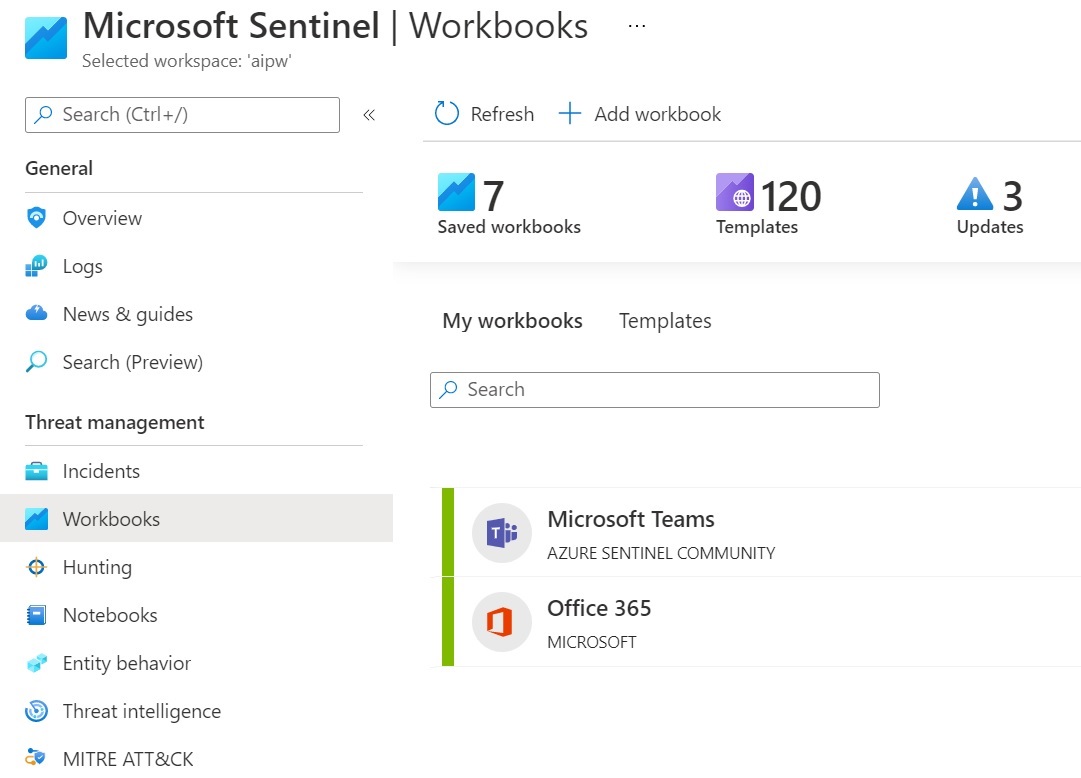
Microsoft Sentinel can be used via the Microsoft Teams workbook or the Office 365 workbook to monitor Teams. The integration is done via the Data Types OfficeActivity respectively via the logs of Microsoft Teams in M365.
In the Microsoft Sentinel Content Hub, the template "Microsoft Sentinel for Teams" is now also available as a preview. The template installs 2 Analytics Rule, 7 Hunting Query and 2 Playbooks with which Teams can be monitored and the logs can be filtered for threats.
The installation is dialog-driven and quite simple. When the deployment has been successfully completed, the following page is displayed with an overview of what was installed.

What is deployed?

Analytics

Analytics Rules are used to create rules for threat detection. The template creates two rules for Microsoft Teams:
  • External user added and removed in short timeframe: This rule flags when external users are added to a Team and then removed within an hour.
  • Multiple Teams deleted by a single user: This rule indicates when multiple Teams are deleted within one hour. 
These analysis rules are created in disabled mode and can be enabled / customized in the analysis rules gallery in Sentinel:

Hunting Queries

Microsoft Sentinel provides queries to search for threats in the connected data sources. This enables targeted searches for suspicious behavior or unusual activity. The template installs the following hunting queries with a focus on Microsoft Teams:
  • External user from a new organization added to Teams: This query identifies external users that have been added to Teams, where the user's domain has not yet been used.
  • Multiple Teams deleted by a single user: This query shows when multiple Teams have been deleted by a single user within a short period of time.
  • Bots added to multiple Teams: This query helps identify bots that have been added to multiple Teams in a short period of time.
  • User made owner of multiple Teams: This identifies users who have been made owners of multiple Teams.
  • Previously unseen bot or application added to Teams: New and possibly unapproved applications or bots added to Teams are identified with this query.
  • Files uploaded to Teams and access summary: This query shows files uploaded to SharePoint via a Teams chat and summarizes the users and IP addresses that accessed those files. This allows for the identification of anomalous file sharing patterns.
  • User added to Team and immediately uploads file: This identifies users who have been added to a Team or Chat and uploaded a file via Chat within one minute of being added. This could be an indicator of suspicious activity.

Playbooks

Playbooks are a collection of procedures that can be executed in response to an alert or incident. A playbook can be used to automate actions when certain warnings or incidents are detected.
A sticking point in the "Playbook" setup step, as seen in the screenshot, is that a user must be added here who has the right to connect to the Teams API.

To do this, this user must be given consent. A simple way to do this is described here: https://docs.microsoft.com/en-us/graph/auth-v2-user#consent-experience The user that you want to use logs in and grants consent. The fact that the link to which you are then redirected is empty is irrelevant.
The following playbooks are deployed:
  • IdentityProtection-TeamsBotResponse
  • Post-Message-Teams