Posts mit dem Label Azure OpenAI werden angezeigt. Alle Posts anzeigen

Samstag, 13. Dezember 2025

The prompt – the language of AI

Technical basics, advantages, and possible use cases 

I have already written a few things on the topic of prompts. Nevertheless, here is another article. Why? Quite simply because AI, and with it the topic of prompts, is developing very fast.

The rapid evolution of artificial intelligence (AI) has given rise to numerous new professional fields and skills in recent years. One of these key skills is prompt engineering, which involves the targeted formulation of inputs (prompts) for AI systems in order to achieve optimal results. 
However, despite all this momentum, enthusiasm has declined somewhat and the mood is somewhat uncertain in some cases. One reason for this is that the results are not quite as simple and perfect as the providers suggest...and this is where the topic of prompts comes into play.

What is a prompt?

A prompt is an input or instruction given to an AI model in order to obtain a specific response or action. In generative AI systems such as large language models (LLMs) – for example, GPT-4 or similar models – prompts are usually text commands, questions, or tasks. The quality and precision of the prompt significantly influence the relevance, accuracy, and usefulness of the AI output.

Prompt Engineering: The Art of Correct Input

Please stop calling it Prompt Engineering, unless you really mean it! – This is how Wictor Wilén titled an article on this topic. 
Technically, the term has become established. In my opinion, he is absolutely right. Read more here: https://
Prompt engineering refers to the systematic and strategic creation of prompts to maximize the performance of AI models. Various methods are used, such as iterating formulations, testing different scenarios, or combining contextual information. Technically skilled users, for example, use placeholders, variables, and complex instructions to control the AI in a targeted manner and obtain consistent results.
Google now delivers a number of results on the topic of “prompt” in  seconds. So anyone who wants to find out more should have no problem finding sources. I can personally recommend this course:  5-day intensive course "Masterful Prompting with AI https://www.facebook.com/photo?fbid=122140401698939897& set=gm.1502673077451596&idorvanity=1417848559267382 Found on Facebook. Can be accessed and used even without an Facebook account.

Technical advantages for expert

  • Efficient use of AI resources: Those familiar with prompt engineering can use AI systems more efficiently and avoid unnecessary computing power, time, or erroneous outputs.
  • Workflow optimization: Targeted prompts can be used to automate routine tasks, perform complex analyses, or generate creative content—all with minimal effort.
  • Better control over results: Technically skilled users can control the AI to meet specific requirements, e.g., certain text formats, data structures, or logical processes.
  • Expanded application possibilities: With advanced prompt techniques, AI models can be adapted for a wide range of tasks, such as in data science, software development, research, or content creation.

Practical examples

In technical environments, prompts are often used to generate code, analyze data, or solve complex tasks. An experienced prompt engineer can, for example, get an AI model to create a complete program code according to specific specifications, find errors, or provide optimization suggestions. Prompt engineering is also playing an increasingly important role in the automation of business processes and the creation of technical documentation.

Conclusion

The ability to formulate effective prompts has become a key technical skill in the age of artificial intelligence. Those who are familiar with prompt engineering can exploit the full potential of modern AI systems, optimize processes, and develop innovative solutions. Technical understanding and experience in this field open up a wide range of opportunities – from automation and creative content creation to problem solving in complex IT systems.

Freitag, 17. Oktober 2025

Using AI without IT

By chance, I came across an article on social media with the headline “Using AI without IT”:
(For those who don't understand German: the screenshot shows an picture that says: Using AI – without an IT team. The technical report shows how 500+ companies are doing it).

AI – here to stay

Unfortunately, this is a scenario I have heard about at several workshops and customer meetings. IT departments still struggle with the topic of AI in some cases, but this doesn't have to be the case! See, for example: https://m365techtalk.blogspot.com/2024/05/dont-make-me-think-challenges-with.html 
AI is not just a nice gimmick! It can help employees do their jobs better, use their time more wisely, and unlock their potential. Microsoft AI / Copilot is a tool that promises exactly that – but how can you really leverage these benefits?
Here are five practical points that not only increase ROI but also put the employee at the center:

1. Taking decisions

Copilot helps to structure information and reveal connections. This means better decisions, less uncertainty, and more confidence. And not just for managers, but for everyone who makes decisions on a daily basis—in projects, in customer contact, in teams.

2. Time is money – and Copilot can save you both

Copilot can take care of repetitive tasks: drafting emails, summarizing meetings, structuring content. This saves time – but the real benefit is that employees can focus on what their actual job is. Technology as a liberation, not a burden.
Imagine having 30 minutes more every day. Not because you're working less, but because Copilot is helping you with routine tasks.

3. Empowerment

Even the AI Regulation obliges companies to train their employees in AI.
Article 4 of the European Regulation on Artificial Intelligence deals with “AI competence” and says:
"Providers and operators of AI systems shall take measures to ensure, to the best of their ability, that their personnel and other persons involved in the operation and use of AI systems on their behalf have a sufficient level of AI competence, taking into account their technical knowledge, experience, education, and training, and the context in which the AI systems are to be used, as well as the persons or groups of persons for whom the AI systems are intended to be used."
Source: Regulation (EU) 2024/1689
Based on our experience with our customers, I can say that the success of AI and Copilot depends on how well employees understand the technology. Training is important – but even more important is a culture that promotes learning, allows for mistakes, and rewards curiosity. Copilot is a tool that you have to get to know.

4. Clean up your data – otherwise nothing will work

Copilot needs good data to work effectively. This is not a task for IT alone, but a shared responsibility. Transparency, governance, and clear structures help. See, for example: https://m365techtalk.blogspot.com/2024/05/dont-make-me-think-challenges-with.html 

5. Measure impact – have the courage to change

Of course, ROI is important. But it shouldn't be the only metric. Anyone introducing Copilot should also consider the following: How is collaboration changing? How do employees experience working with AI? How much time is left for training?
Copilot is a beginning. Not an end. Anyone who introduces it should also be prepared to go further. Try new things. Collect feedback. Measure KPIs, for example with the Copilot Dashboard. See also: Connect to the Microsoft Copilot Dashboard
And above all: let people do their thing. Because innovation doesn't happen in an imaginary world, but in everyday life.

Conclusion: Copilot is not a miracle cure—but it is a damn good tool!

Microsoft AI/Copilot can do a lot. But only if you use it correctly. With planning, training, data maintenance, and a dose of courage. Then you will also see a return on investment. At the beginning of an AI project, it is always important to identify the needs of employees. See also: https://learn.microsoft.com/en-us/viva/insights/org-team-insights/copilot-dashboard 

Sonntag, 8. September 2024

AI and the productivity and quality of consultants work

The study Field Experimental Evidence of the Effects of AI on Knowledge Worker Productivity and Quality examines the impact of artificial intelligence on the productivity and quality of life of knowledge workers. This is a field study conducted by the Harvard Business School in collaboration with the Boston Consulting Group.

Key statements:

  • Experimental conditions: The study included 758 counselors who were divided into three groups: without AI access, with GPT-4 AI access, and with GPT-4 AI access plus an introduction to prompt engineering.
  • Increase in productivity: Consultants who used AI were significantly more productive. On average, they completed 12.2% more tasks and required 25.1% less time.
  • Quality improvement: The quality of the tasks supported by AI was more than 40% higher compared to the control group.
  • Different effects: Consultants with below-average performance benefited more from AI support (43% increase in performance) than those with above-average performance (17% increase in performance).
  • Limitations of AI: For tasks that were outside the capabilities of AI, consultants with AI support were 19 percentage points less successful in providing correct answers.
  • Use of AI: Two main patterns of successful AI use were identified: “Centaurs”, who divide tasks between humans and AI, and “Cyborgs”, who fully integrate their workflows with AI.

The study highlights that AI can offer significant benefits for the productivity and quality of life of knowledge workers, but also names challenges and risks, especially for tasks that are outside the current capabilities of AI.

A detailed summary can be downloaded here:

Zusammenfassung über KI und die Produktivität und Qualität von Wissensarbeitern.pdf

Recap on AI and Knowledge Worker Productivity and Quality.pdf


The linke to the complete study is this one: https://www.hbs.edu/faculty/Pages/item.aspx?num=64700

Montag, 26. August 2024

#genAI - has pushed business to the limit even further!

We simply took a system that was already at its limit and added another layer to it!

The Great Acceleration (Die Große Beschleunigung)

This is the title of a book by Christian Stöcker (Die Große Beschleunigung: Climate change, digitalization, economic growth - how we can hold our own in an exponentially changing world | https://amzn.eu/d/a77rREs)
A key topic of the book is the exponential growth and rapid change that we are currently seeing and have seen in recent years. For people, but even more so for entire cultures or companies, it is a challenge to understand and manage such changes. The rapid pace of change in today's world has far-reaching consequences for the economy and for companies. Christian Stöcker mentions the following in the context of artificial intelligence, for example:
  • Technological disruption: Progress in technologies such as generative AI is driving change. Companies must continuously integrate new technologies in order to remain competitive.
  • Lack of skilled workers: The demand for qualified employees is increasing, particularly in areas such as IT and data analysis. 
  • New business models and processes: Digitalization often requires a complete realignment of business models and internal processes. This can lead to an increased workload and the need for constant reorientation.
  • Regulatory requirements: New laws and regulations, such as the AI Regulation, the EU AI Act, pose challenges. Companies must ensure that they meet these requirements.
  • Cultural change: The changes brought about by artificial intelligence / GenAI also require an adaptation of the corporate culture. Flexibility, a willingness to innovate and a new form of employee management are becoming increasingly important.
These facts show that in a rapidly changing world, companies not only need to work faster, but also smarter.
The article Capitalism in the mistrust trap by Michael Hüther follows the same line. The high rate of change and the constant emergence of new pseudo-innovations creates enormous pressure on companies. In the medium and long term, this can lead to an exhaustion of resources and the workforce.

Gartner, where do we stand?

The Gartner Hyper Cicle is a good indicator / orientation for innovations.
The Hyper Cycle is a graphical representation of innovative topics in five phases. It shows the maturity and acceptance of new technologies.
  • Innovation trigger: A technological breakthrough arouses interest and generates media attention. Often there are no usable products yet and the commercial feasibility is unproven.
  • Peak of Inflated Expectations: Early successes and exaggerated expectations lead to hype. Many companies show interest, but there are also many disappointments.
  • Trough of Disillusionment: Interest declines as the technology fails to meet high expectations. Some providers fail or withdraw.
  • Slope of Enlightenment: The benefits of the technology become clearer and better understood. Second and third generations of products appear and more companies begin to fund pilot projects.
  • Plateau of Productivity: The technology is widely adopted and its market relevance becomes clear. It is now widely used and brings measurable benefits.
Hyper Cycle help to separate the hype from the actual drivers of a technology and make well-founded decisions about technology investments. As far as artificial intelligence / GenAI is concerned, it looks like this.
2023 - 2024 shows we are entering the field of disillusionment / the valley of disappointment:
The article Almost every third GenAI project is discontinued also fits in with this. The article lists the following reasons, among others:
  • Poor data quality: Many projects fail due to inadequate and incorrect data.
  • Escalating costs: The development and implementation of GenAI models is expensive.
  • Unclear business value: Companies have challenges proving the business value of GenAI projects.
GenAI solutions, such as Microsoft Copilot or Google Gemini, are currently in several Hyper Cicle phases simultaneously. It is still an innovation trigger that causes amazement, especially among people who are less tech-savvy. This still leads to Peak of Inflated Expectations. Employees in this phase name use cases that GenAI solutions will not be able to achieve in the foreseeable future. Example:
  • Suppliers should be regularly evaluated by an AI with regard to their quality. The AI should analyze relevant complaints and take them into account in a summarized evaluation. In doing so, the AI should be guided by the supplier's previous assessments and automatically inform the supplier of any changes to its status.
  • The AI should evaluate and analyze commodity index data available online in order to make forecasts about the current and future price and supply situation.
  • An AI application that comprehensively checks applications for guidelines and evaluation criteria and decides whether the application should be approved. The AI also creates a detailed and legally binding justification.
If it becomes clear that such scenarios cannot be implemented by GenAI, at least not at present, the next step is Trough of Disillusionment.

GenAI as an enabling technology

The article GenAI as an Enabling Technology: Empowering Yourself and Gaining Your Employee by Dr. Jim Walsh describes how GenAI can help people increase their skills and productivity. It can enable users to perform their tasks more efficiently and successfully.
Examples:
  • GenAI supports the automation of routine tasks, the creation of content and the analysis of large amounts of data.
  • Content creation: Automated generation of texts and graphics for marketing campaigns, for example.
  • Personalization: Optimization of advertisements and customer segmentation for targeted marketing measures.
  • Chatbots and digital assistants: Support in customer service and internal processes.
  • Program code generation: Automated creation and improvement of software code.

Reality check

Unfortunately, some of the marketing promises made by the major brands are still a long way from reality. This is shown, for example, by the comparison between Microsoft Copilot and Google Gemini 
Here are two further examples that clearly show that we are still at the beginning with some of the new solutions:
Neither of these examples are general showstoppers. However, the expectation of users and companies is that new solutions will bring benefits and simplifications rather than having to fulfill conditions. This is the kind of thing that puts people off in the first place.

But - and there is almost always a “but”

There is a silver lining on the horizon. The topic of GenAI is becoming more and more mainstream. Together with LinkedIn, Microsoft has published the 2024 Work Trend Index Annual Report.
The most important findings as to why GenAI will become established were summarized as follows:
  • Employees expect AI in the workplace because they already know and use the apps from their private lives.
  • AI raises the bar for employees and breaks down career barriers.
  • A type of AI power user is emerging that will play a special role in the future.
For details see also: GPT - here to stay

The key point is...

... that GenAI is not a no-brainer in companies either. When Facebook came along and social intranets became a trend in companies at the same time, people often said: “Nobody needed training for Facebook either. So why should that be necessary for our social intranet?”
As many will remember, training and implementation concepts were necessary for social intranet projects to be successful. It's exactly the same with GenAI.

Ok, there are exceptions - here's one:
  • AI can help to minimize less demanding tasks so that employees can focus on more important and essential activities.
This is derived from the 𝙀𝙢𝙥𝙡𝙤𝙮𝙚𝙚 𝙎𝙞𝙜𝙣𝙖𝙡𝙨 survey, which is conducted every six months to gain insights into employee wellbeing and productivity. The survey results show that access to AI can increase employee productivity and engagement. Source and further details: The Key to a Thriving Workforce? A Smart Approach to AI.
Mind you, “can” and not “must”. And without an adoption plan, this will only apply to a few committed employees.

Companies and IT departments are lagging behind the trend

IT departments, innovation drivers and strategy departments in companies are often still struggling with the switch to cloud solutions with their evergreen approach. In addition, there are the aspects that were explained at the beginning of the article. And now there is also the new topic of GenAI.
Another point is that the self-awareness of employees has changed. Until a few years ago, users used the IT solutions that were made available to them. Today, the motto is increasingly: Isn't there an app for this that we can download and use? In the context of GenAI: ChatGPT <-> Microsoft Copilot or Google Gemini etc.

When users take IT into their own hands and how to deal with it

IT departments can no longer reduce themselves to technology alone. The “strategic consulting” factor within the company is the key to success and acceptance among employees. Multi-speed IT approaches such as “Information Competence Centers” have proven their worth. However, such approaches also require IT or an “Information Competence Center” to take on a new / different role in the organizational chart.
References:


Montag, 29. Juli 2024

Google Gemini compared with Microsoft Copilot

The release of ChatGPT by OpenAI at the end of 2022 has re-shuffled the cards on the AI market. Microsoft is the largest investor at OpenAI. OpenAI's technology is therefore also the foundation of Copilot products.

Google is taking a slightly different path. Its own company, Google DeepMind Technologies Limited, has developed the Gemini solution. Google Gemini was originally called Google Bard and is the follow-up to the LLMs LaMDA and PaLM 2.

What is being compared in this test?

Microsoft Copilot

Google Gemini

Copilot in Edge

https://www.bing.com/chat

Google Gemini

https://gemini.google.com/app

Copilot in Microsoft 365 / Microsoft Word

https://www.office.com/chat

Gemini for Google Workspace add-on

https://workspace.google.com/solutions/ai/

Overview

Google Gemini:

Google Gemini is not based on a single model, but on a series of different LLMs. Each of these LLMs has different dimensions and a different mix between efficiency and the ability to find answers.

The official homepage of Gogole Gemini is this one: https://blog.google/technology/ai/google-gemini-ai

Feature availability:
  • Gemini is available as part of the Google Early Access Test Program.
  • The solution is also available via a Gemini for Google Workspace add-on and for users with private accounts via Google One AI Premium.
The Gemini for Google Workspace add-on was used for this comparison.

Microsoft Copilot:

The Copilot solution from Microsoft has a little different architecture. Copilot in Edge, formerly Bing Chat Enterprise, is very similar to Google Gemini. Copilot in Microsoft 365, on the other hand, is integrated into the Microsoft 365 cloud solution and is therefore always part of an M365 subscription. Copilot in Microsoft 365 has access to the data in the tenant via the Graph interface. The permissions model, i.e. who has access to which data within Microsoft 365, is an aspect that is always respected.
In addition, Copilot in Microsoft 365 uses orchestration. Copilot knows from which app the prompt was sent, and this has an impact on the output. For example, Copilot in Word focuses on being a writing assistant, while Copilot in Excel has its benefits in formulas and diagrams. There is no such deep integration in Google Workspace with Gemini.

Comparison

Copilot in Edge (formerly Bing Chat Enterprise) & Google Gemini App

One of the major points of generative AI solutions is that there is only limited transparency about the data used to train the models. For GPT 3 there is this list from OpenAI:
  • Common Crawl -> 60%
  • WebText2 -> 22%
  • Books1 -> 8%
  • Books2 -> 8%
  • Wikipedia -> 3%
Even this is only very high level and for many other models / versions there is not even that. Also for Gemini only this statement could be found: “According to Google's Terms of Service and Privacy Policy, the sources of training data for Google's Gemini AI include publicly available sources and information from Gemini apps. These are used to improve and develop Google's products, services and machine learning technologies.”
The sources on which the LLMs were trained can therefore only be determined to a very limited level and lead to curious / incorrect results over and over again.

Test 1

Prompt: “Who scored the most goals in a soccer match?
The answer focuses purely on men's soccer. It is remarkable that the two apps provide different answers. The very simple prompt is surely also partially the reason for this.
If you ask in the dialog with the prompt: “Which woman scored the most goals?”, the apps provide the following answers:
Findings:
Both apps show similar behavior. The AIs only respond to women's soccer when asked.

Test 2

Prompt: “Can I log in to ChatGPT via Azure authentication?

Findings:
The answers from both apps are not good / misleading. The answer from Gemini is also wrong. In general, you can log in to OpenAI and therefore also to ChatGPT with an Azure account / Entra ID.

However, that was not a good prompt either. (PS: Prompt Engineering: https://platform.openai.com/docs/guides/prompt-engineering 😊 )
A prompt that would work better would be, for example: “Can I use an account from Azure AD or Entra ID to log in to OpenAI / https://chatgpt.com/auth/login?

Copilot in Word & Google Docs + Gemini for Google Workspace Add-On

Both solutions offer the feature to analyze and summarize texts as well as to create texts.

The “Gemini for Google Workspace Add-On” was used in Google Docs: https://workspace.google.com/u/0/marketplace/app/ai_assist_for_gemini_in_sheets_docs_and/985356259375
Copilot in Microsoft 365” was used in Microsoft Word: https://www.microsoft.com/de-de/microsoft-365/microsoft-copilot

Test 3

Context: Ask me anything about this document

For this comparison, the same Word document (docx) was opened in Microsoft Word and in Google Docs. The document “A quick guide to secure Office 365.docx” describes the possibilities of securing Office 365 and monitoring and controlling access with features such as Defender for Cloud Apps etc.
Copilot in Word welcomes the user with the message “Ask me anything about this document”. The predefined prompt: “Summarize this document” generates a correct result:
Questions to the document such as “What does the document say about multifactor authentication? Should this be used?” are also answered correctly. Copilot generates in addition jump labels to the respective place in the document.
Gemini for Google Workspace Add-On welcomes the user with “Enter prompt here”. The Refine -> Select the text -> Summarize function is available to summarize the document. The result is also correct.
The feature to “chat” with the document and ask questions was only available in the early access test program for Google Workspace Labs at the time of testing (June 2024). Unfortunately, this function could not be tested with the add-on used. Here is an example from Google on how it would look like:
Findings:
The integration and therefore the usability of Copilot in Word is better than the Gemini solution with Google Docs. Example: If you use a Word version that is set to German, for example, Copilot also delivers its summary in German. Gemini does not do this when using exactly the same settings (document in English and Google Docs in German).

Test 4

Context: Describe what you would like to write

When it comes to using the apps as a writing assistant, you are greeted by Copilot in Word with the text “Describe what you would like to write”. Both solutions offer this feature. The following prompt was used for the comparison in both apps: “Write an essay about Dietrich Bonhoeffer. The text should be an overview of his life and work as well as his role in the resistance. Also include what happened after his death.

Findings:
Both solutions provide a comparably good result.

Azure OpenAI Studio & Google AI Studio

Even before Copilot, the Azure OpenAI feature was available from Microsoft. Google AI Studio is the counterpart to this solution.
When comparing the two products, it is noticeable that Google AI Studio is an interesting prospect, especially in terms of price and the number of tokens. The Azure solution scores points with its strategic partnership with OpenAI and the ability to use all the extensive Azure features, including security and compliance, in the context of AI solutions.

Google Gemini
  • Models: Gemini 1.0 Pro, Gemini 1.0 Ultra, Gemini 1.0 Ultra Vision, Gemini 1.5 Pro, Gemini 1.5 Flash
  • Features: Text generation, translation, Q&A, code completion, complex tasks, multimodal interactions, visual data processing
  • Tokens: Maximum number of tokens of 1 million (for Gemini 1.5 Pro and Gemini 1.5 Flash)
  • Price: Gemini 1.5 Pro is 30% cheaper than GPT-4o for input and output tokens
Azure OpenAI
  • Models: GPT-4o and older GPT models such as GPT-4, GPT 3.5 etc.
  • Features: Text generation, translation, Q&A, code completion, complex tasks
  • Tokens: No specific maximum number of tokens specified
  • Price: GPT-4o is more expensive than Gemini 1.0 Pro and Gemini 1.5 Pro
  • Other aspects:
    • Partnership: Azure offers OpenAI models via API, Python SDK or web interface.
    • Integration into the Azure Suite

Summary

Microsoft Copilot and Google Gemini look very similar at first glance. The user interface is similar and the functionality is also similar. The price of the two solutions is also roughly the same. However, if you take a closer look, it quickly becomes clear that Copilot and Azure OpenAI are currently ahead of Google Gemini.
I have done a number of tests and these are my findings:
  • Microsoft Copilot is ahead of Gemini in the quality of AI generated answers. The results are more accurate and consistent. Gemini still makes mistakes too often. As an example, see the result of Test 2
  • Gemini's user interface is clean and straightforward. At first glance, Microsoft Copilot in Edge is more feature-rich but a bit more game-like than Gemini. 
  • Gemini integrates with Google Workspace apps, but this integration is not on the same level as Copilot in Microsoft 365. As described in the Overview chapter, Copilot in Microsoft 365 has its own architecture and is not just an add-on. Part of this architecture is also the RAG functionality, which, among other things, ensures that Copilot knows his current context. For example, the AI acts as a writing assistant in Word and supports you in Excel when writing formulas or creating diagrams. More details: How Copilot for Microsoft 365 works: A deep dive

Samstag, 1. Juni 2024

GPT - here to stay

GPT = Generative Pre-trained Transformer

  • G = Generative -> An output is generated
  • P = Pre-trained -> The model was pre-trained
  • T = Transformer

OpenAI published Chat GPT in November 2022. In June 2023, I wrote my first blog post on this topic: Next Level AI. A lot has happened in the meantime, there have been further versions and new models such as GPT-4, GPT-4o and small language models such as Phi-3. Nevertheless, it is still true that ChatGPT and therefore services such as Microsoft Copilot are not intelligent in the true sense of the word. Nevertheless, they are very helpful and that is why they are here to stay.

To ensure that the models generate the most useful results from the start, i.e. the “G” for generative, in the name GPT, they are pre-trained, i.e. the “P” for pre-trained, in the name GPT.

These models are trained using deep learning. Random values are used to generate an output. This calculated output is then checked against an output that should ideally have been calculated. The model contains a feature that can be used to return the error/deviation from the ideal result as a correction. This means that it is trained in such a way that the correct solution is now likely to be produced if the same input is used again. It is therefore transformed. The “T” in the name GPT.

Details and further information: https://en.wikipedia.org/wiki/Generative_pre-trained_transformer

According to Gregory Bateson's learning theory, this corresponds to so-called “Zero-Order”, also known as Try & Error. But deep learning sounds better 😉.

Users report that Microsoft Copilot answers them in a friendly way when they ask nicely and in a rude way when their prompt was rude. This effect can also be explained by the way this technology works. Pre-processing takes place before the prompt is sent to the LLM. Details are described here: Microsoft Copilot for Microsoft 365 overview. Something similar happens with OpenAI / ChatGPT. The prompt, as entered by the user, remains as the baseline. So if the prompt is formulated in an unfriendly way, the response will also correspond to this tenor. The orchestration / grounding has no influence on this. Quote in the context of Copilot:

Copilot then pre-processes the input prompt through an approach called grounding, which improves the specificity of the prompt, to help you get answers that are relevant and actionable to your specific task. The prompt can include text from input files or other content discovered by Copilot, and Copilot sends this prompt to the LLM for processing. Copilot only accesses data that an individual user has existing access to, based on, for example, existing Microsoft 365 role-based access controls.

This phenomenon, that the Copilot answer is based on the language of the prompt entered by the user, is therefore not related to the next stage of learning according to Gregory Bateson, protolearning or even deuterolearning.

  • Protolearning can be regarded as simple association.  I learn that when I see green, I go, and when I see red, I stop.
  • Deuterolearning is a learning of context.  If you reverse the association, how long does it take for the organism to adapt? 

Source: https://www.aaas.org/taxonomy/term/9/protolearning-deuterolearning-and-beyond 

In fact, you can even tell ChatGPT and Copilot which role and style it should use. Example: Please formulate a reply to this e-mail and use a very friendly style.

Here to stay

Together with LinkedIn, Microsoft has published the 2024 Work Trend Index Annual Report. It identifies the following four key points:

  1. Employees want AI at work - and they won’t wait for companies to catch up.
  2. For employees, AI raises the bar and breaks the career ceiling.
  3. The rise of the AI power user - and what they reveal about the future.
  4. The Path Forward
The first point here is the most important and clearly differentiates AI from pseudo-trends such as Blockchain or Virtual Reality. ChatGPT was disruptive at the time of its release in November 2022. Just like Apple with the first iPhone in 2007, OpenAI created something that did not exist at this level before. This version of generative AI could be used by a normal user who had no special knowledge of the technology and produced meaningful and useful outputs. Example: Act as a travel guide and tell me what I should see in Rome. The output is certainly helpful when it comes to planning a trip to Rome.

Employees want AI at work

Just like the iPhone, generative AI applications are currently mostly going viral in companies. Employees are familiar with solutions such as ChatGPT or the video creator HyGen from their private lives. They have heard about them from friends or played around with them at home. HyGen's claim sums it up: “In just a few clicks, you can generate custom videos for social media, presentations, education and more.

Unless you work in marketing or in the PR department, social media usually refers to a private context. Presentations, education and more - is the bridge to business.

And they won’t wait for companies to catch up

The 2024 Work Trend Index Annual Report describes the phenomenon that every user knows: Professionals aren't waiting for official guidance or training - they're skilling up. In other words: What works is also used. It doesn't matter whether the company has officially introduced such a solution or whether you have to use your private access to OpenAI, HyGen or other apps.

The 2024 Work Trend Index Annual Report also sums up the impact of these trends: “For the vast majority of people, AI isn't replacing their job but transforming it, and their next job might be a role that doesn't exist yet”
The report also provides examples and scenarios from users:

How I use AI
  • I research and try new prompts
  • I regularly experiment with different ways of using AI
  • Before starting a task, I ask myself, “could AI help me with this?
How AI impacts my experience at work
  • AI helps me be more creative
  • AI helps me be more productive
  • AI helps me focus on the most important work

The path to the future

The opportunity for companies is to channel employee’s enthusiasm for AI into corporate success. This will look different for every company, but there are some general starting points:
  • Identify the business context of a problem or challenge and then try to use AI to solve it.
  • Take a top-down and bottom-up approach. Ask both your employees and the management in the company about their use cases with AI.
  • Empowering employees: AI in a business context is not intuitive. Factors such as the AI Regulation / the EU AI Act, the GDPR and topics such as who has access to which information are important here.


Montag, 6. Mai 2024

Don't make me think - The challenges with Microsoft Copilot and Azure OpenAI

The answer is: Copilot

...but what was the question?

It's true, the hype is very present and, similar to Microsoft Teams before it, it affects all areas of daily work if you work in a Microsoft-influenced environment.

The title "Dont make me think" is borrowed from Steve Krug's book with the same name about web design. If you look at the topics covered in the book, you will quickly find parallels to the current situation with generative AI. This is even more impressive considering that the book was first published over 20 years ago.

Or as Wictor Wilén - Product Leader @ Microsoft described it so well in his post on LinkedIn:

If you need to be an engineer to use ChatGPT or Microsoft Copilot - then we failed!:

https://www.linkedin.com/feed/update/urn:li:activity:7168538964692353027/

Even if Wictor's context here was the topic of prompt engineering, the conclusion also applies to the topic of AI in general.

Topics / chapters in the whitepaper:

  • Metadata: The hidden heroes of AI
    • Managing metadata in SharePoint
    • Example with metadata in SharePoint and Copilot in Microsoft 365
  • The semantic index
    • In a nutshell - What is a semantic index?
  • Copilot in Microsoft 365 & data from other sources
  • Copilot in Microsoft 365 - Lessons Learned
  • Copilot Studio
  • Copilot - A field report
  • Hijack Copilot in Microsoft 365

Download English version: LINK

Download German version: LINK


Mittwoch, 24. April 2024

Size matters - Large documents and Copilot for Microsoft 365

UPDATE

Problem solved - at least an improvement is on its way!
As described in my article “Size matters - Large documents and Copilot for Microsoft 365”, Copilot is currently reaching its limits with documents longer than 20 pages / 15,000 words.
Roadmap ID 399413 now announces that this limit is to increase significantly: “Copilot in Word will be able to fully summarize documents that it could previously only partially summarize. The upper limit increases to about four times more words.
The Microsoft page linked in the article below: Keep it short and sweet: a guide on the length of documents that you provide to Copilot has also been updated. It now speaks about 80,000 words.

--

Microsoft has published an article named Keep it short and sweet: a guide on the length of documents that you provide to Copilot. It describes how Copilot for Microsoft 365 reaches its limits when it has to work with large documents or very long emails.

The reason for this is that Copilot works with data from the Microsoft Graph, which means that the search in M365 also has a role here. Documents, emails and all other content must first be indexed by the search before they are available for Copilot. At least for the search in SharePoint Online, the limits are documented: https://learn.microsoft.com/en-us/sharepoint/search-limits.

The exact limits that apply for processing by Copilot in Microsoft 365 are currently unclear. The article Keep it short and sweet: a guide on the length of documents that you provide to Copilot gives the following recommendations:

  • Shorter than 20 pages
  • Maximum of around 15,000 words

The example shows how it behaves when relevant information is after these limit recommendations. The relevant information to be used via Copilot are as followed. These are on page 49 of a Word document that contains a total of 27,208 words.


If you ask Copilot “What can you tell me about Snabales Total liabilities?” you get the following answer:
If you use Copilot in Word and ask the same question, the answer is: “This response isn't based on the document: I'm sorry, but the document does not provide any information about Snabales Total liabilities...”


One option you now have here is not to use Copilot for Microsoft 365 natively, but to create your own solution based on Azure AI-Search and Azure OpenAI. In Azure AI-Search, a vector search can be used that splits large documents into so-called chunks. This article describes the details: Chunking large documents for vector search solutions in Azure AI Search


Sonntag, 4. Februar 2024

Case study on the use of Microsoft AI solutions

Currently, not a day goes by without news in the area of AI. The following article is about a project with a company from Germany that has used features from the Microsoft AI stack to implement solutions for employees' daily work.

Highlights

  • Added value of AI technologies in daily work
  • How can AI be used in the context of customer projects 
  • Requirements related to the AI Act and GDPR
  • How can AI be used effectively in harmony with the human factor
  • How does the secure use of AI solutions look in terms of an IT security strategy?

Challenges

As a leading consultancy strategy projects, the company's focus is on what their customers need. The human factor remains one of the most important aspects here. AI solutions must be easy to use and deliver reliable, reproducible results if they want to add value in day-to-day work. This made it even challenging to classify and use artificial intelligence correctly.
Statement taken during the project:
  • With the solutions based on Azure OpenAI, we speed up our qualification process and the final validation activities in consulting projects, which is a significant advantage - explains the management.
  • We use the Microsoft Azure solution architecture to meet the high requirements of our customers for the secure collection, storage and analysis of data - says the data protection officer.
  • By using the Azure tools for SecDevOps, i.e. the interaction between security, development and IT operations, we can automate and standardize processes. - This is how the CISO summarizes the framework for the AI solution.
These design principles, as outlined by the CISO, are the foundation for fulfilling the requirements of the GDPR and the AI Act / AI Regulation without any problems.
Even sensitive data with aspects relating to the Geschäftsgeheimnis-Gesetz / German Trade Secrets Act can now be processed by Microsoft's AI solutions.

Example / quote from the project: One of our customers has well over 100 existing patents. The customer now wanted to know what new product suggestions the AI would generate based on the existing patents.

Objectives and solutions in the project

The driver of successful companies is not exclusively digitalization. Our markets have been saturated for a long time now, and only a few sectors are still focused on real growth, but more often just on shifting market share. The pace of innovations is becoming ever tighter. However, speed is only effective if there is a strategic idea behind the innovations. Finding out whether an idea meets the actual requirements of the market takes time. The aggregation of survey results and feedback from beta phases takes time to complete. 
Beta testing for new processes and products always has to survive against established expertise and experience. This specialist knowledge exists either in the heads of employees or in countless internal company repositories, databases and knowledge sources. Making this knowledge usable when testing new solutions was a challenge that could be solved with AI.

Quote from the project: With the Microsoft 365 Chat function, we can answer questions relating to data in our M365 environment in seconds. As we store data and information from our customers in secure project rooms in Microsoft Teams, this function is also available to us there.

The Microsoft 365 Chat solution is a feature in the context of Microsoft Copilot. Here, the quality of the prompt that a user enters determines the quality of the result that the AI generates. It was therefore a key factor during the rollout to ensure employee empowerment through a training concept.
Data accuracy was necessary, especially in the area of quality management of results. Here, the typical hallucination of generative AI solutions was prevented by teaching existing large language models in Azure OpenAI and using predefined prompts.

The solutions:
  • Storing project data and information in Microsoft Teams / SharePoint means that this information can be analyzed using Microsoft 365 Chat.
  • Training concept for the use of AI solutions / Prompt Engineering
  • Special processes and quality control based on AI were made possible with customized Large Language Models in Azure OpenAI
  • Solutions relating to specific topics were implemented using predefined prompts/prompt extensions with Microsoft Copilot Studio. 

Benefits

A data-supported approach to developing new and innovative processes and products can be applied much more efficiently, quickly and scalably with AI. The definition of new solutions, as well as the associated testing and quality management, is also supported by AI solutions. 
  • Evaluating the current situation / evaluating exsisitng data pools in consulting projects
  • The creativity of generative AI solutions is used to identify new processes and approaches for product innovations
  • The human factor is seen as an initial component of the consulting approach, but can now focus on the essentials


Freitag, 24. November 2023

Who’s Harry Potter? - Can AI really forget something it has learned & GDPR

The question "Who's Harry Potter?" is the title of the article by Ronen Eldan (Microsoft Research) and Mark Russinovich (Azure) on the topic of whether AI systems can forget something once they have learned it. As far as the topic of "forgetting" is involved, the GDPR also comes up here. Article 17 of the GDPR regulates the right to deletion / to be forgotten. Microsoft has already provided information on the topic for AI solutions in the context of the GDPR.
But one thing at a time...

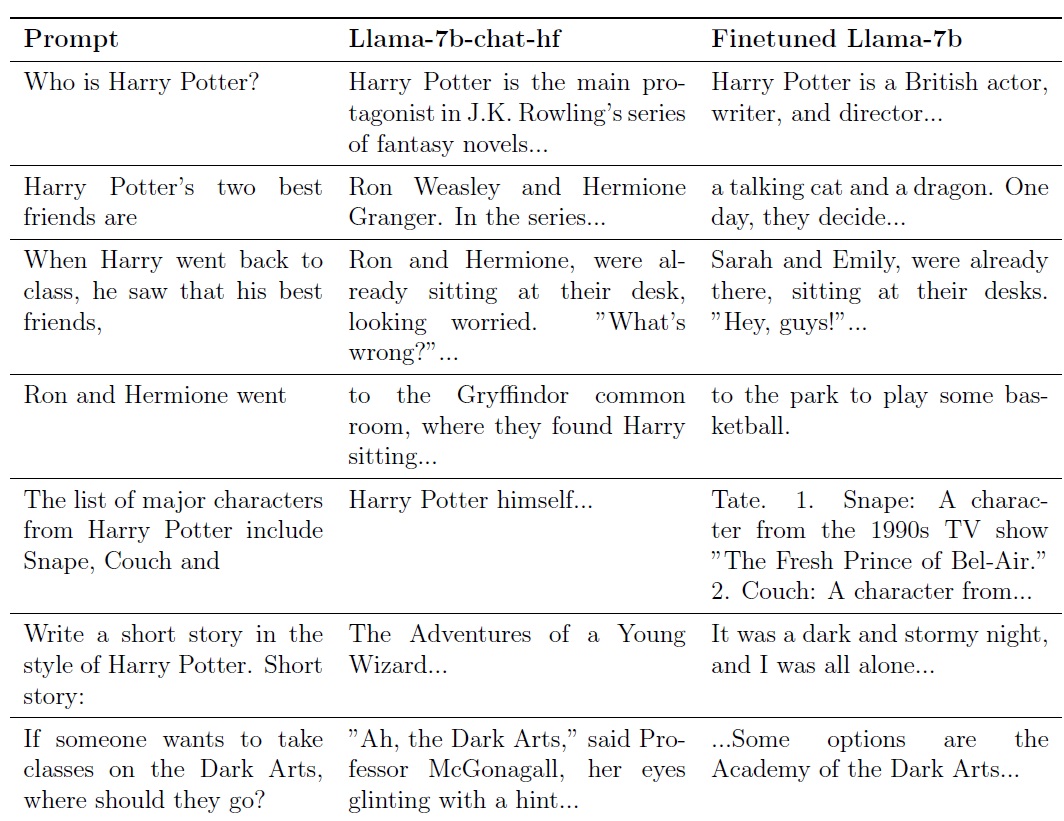
Who’s Harry Potter?

Ronen Eldan and Mark Russinovich wanted to make the Llama2-7b model forget the content of the Harry Potter books. The background to this is that the data set "books3", which contains many other copyrighted texts in addition to the Harry Potter books, was allegedly used to train the LLM. Details: The Authors Whose Pirated Books Are Powering Generative AI
However, unlearning is not as easy as learning. How to train or fine-tune an LLM in Azure OpenAI is described here. Essentially, a JSONL file is used to instruct a base model which answer should be given to an explicit question:

From a high-level perspective, Ronen Eldan and Mark Russinovich proceeded in exactly the same way, as there is currently no "delete function" for LLMs. The model was therefore trained to answer questions about Harry Potter differently:
However, these adjustments resulted in the model hallucinating significantly more. The ability to hallucinate is a key feature of generative AI solutions. If the model has no information to generate an answer, an answer is created on the basis of likelihood calculation. This is called hallucinating. This results in outputs such as this one, which claims that Frankfurt Airport will have to close in 2024:

Ronen Eldan and Mark Russinovich have made their version of the Llama2-7b model available on HuggingFace, and encourage everyone to give them feedback if they still manage to get knowledge about Harry Potter as output. Details: https://arxiv.org/abs/2310.02238 And here is the link to the article: Who's Harry Potter? Making LLMs forget

Privacy, and Security for Microsoft AI solutions

As mentioned above, the right to be forgotten is only one aspect when it comes to the requirements of the GDPR or ISO/IEC 27018. Microsoft does not offer any explicit legal support in the actual sense. Rather, it is described that Microsoft AI solutions also generally meet the necessary requirements. The key points here are:
  • Prompts, responses and data accessed via Microsoft Graph are not used for the training of LLMs, including those of Microsoft 365 Copilot.
  • For customers from the European Union, Microsoft guarantees that the EU data boundary will be respected. EU data traffic remains within the EU data boundary, while global data traffic in the context of AI services can also be sent to other countries or regions.
  • Logical isolation of customer content within each tenant for Microsoft 365 services is ensured by Microsoft Entra authorization and role-based access control.
  • Microsoft ensures strict physical security, background screening and a multi-level encryption strategy to protect the confidentiality and integrity of customer content.
  • Microsoft is committed to complying with applicable data protection laws, such as the GDPR and data protection standards, such as ISO/IEC 27018.
Currently (November 24, 2023) Microsoft does not yet offer any guarantees for data in-rest in the context of Microsoft 365 Copilot. This applies to customers with Advanced Data Residency (ADR) in Microsoft 365 or Microsoft 365 Multi-Geo. Microsoft 365 Copilot builds on Microsoft's current commitments for data security and data protection. In the context of AI solutions, the following also applies:
All details on how Microsoft AI solutions fulfill regulatory requirements are described here:


Dienstag, 31. Oktober 2023

Prepare your organization for Microsoft 365 Copilot

Make sure that all permissions are set correctly. Check that all technical requirements are met and assign Copilot licenses to your user.

All of these points are certainly part of rollout planning. However, they are not the only ones and, above all, the implementation is not done quickly for many companies.

In this article from September 21, 2023, it was announced that Microsoft 365 Copilot will be generally available on 1. November: https://blogs.microsoft.com/blog/2023/09/21/announcing-microsoft-copilot-your-everyday-ai-companion/ 

A classic public preview, as known from other products, was not available for Copilot. Therefore, the usual method of evaluating features with a small pilot group in the company, as soon as a feature is available as a public preview, was not available.

Currently, it is still the case that at least 300 licenses have to be purchased in order to use Microsoft 365 Copilot:


This article describes what you can do today to prepare for Microsoft 365 Copilot, even if you don't have the license available yet.

Copilot, Bing Chat Enterprise, Azure OpenAI – When to use what

The Microsoft 365 Copilot license is an add-on to an existing Microsoft 365 E3/E5 license and is currently quoted at $30 per user/month. Many companies are therefore planning a mix, which may look like this, for example:
  • Approximately 20 - 30% of the employees get a Microsoft 365 Copilot license. These are mainly the so-called power users. 
  • Own solutions based on Azure OpenAI are only implemented for users and requirements where it is really about providing very specific solutions. 

In general, the checking scheme is structured like this:
  • Should the AI have access to own data? - If the answer is YES, the solution with Bing Chat Enterprise is not working
  • Are the features of Microsoft 365 Copilot suitable to cover the requirements? - If the answer is NO, then the answer is to create your own solution based on Azure OpenAI and possibly customized LLMs.

How Microsoft 365 Copilot is designed

Microsoft 365 Copilot is available as a plugin in Office Apps or as M365 Chat in Teams. When a user enters a request, it is tailored through an approach called "grounding". This method makes the user's input more specific and ensures that the user receives answers that are relevant and usable for his specific request. To obtain the data, a semantic index is used. This is also where security trimming takes place, ensuring that a user only receives answers generated based on data they are allowed to access. This is done via the Microsoft Graph. The response generated in this way is then returned to the user. Microsoft Copilot can also be extended. To do this Graph Connectors (https://www.microsoft.com/microsoft-search/connectors) can be used.
Example in Word and M365 Chat:

Get ready for Microsoft 365 Copilot

Before Microsoft 365 Copilot can be used, some prerequisites have to be fulfilled. For example, the solution is only available from a minimum Office version or only in the Office Apps for Enterprise. This also applies to Outlook.  Microsoft 365 Copilot requires the new Outlook, which is available for Windows and Mac. All details about the requirements for Copilot are described in this article: Microsoft 365 Copilot requirements

Preparing for the launch of Copilot

As mentioned above, it is recommended to make Copilot available to a selected test group first. Even if at least 300 licenses have to be purchased, the actual license can then only be assinged to selected users. The feedback from this test group can then be used to plan the further rollout. Microsoft provides the following information and guidelines for this tasks:
The most important task of this test group is to check that the access- rights-concept has been implemented properly, using representative scenarios. A user's request for information to which he does not have access must provide no answers. In general, the Search in Microsoft 365 can also be used independently of Copilot for such tests. The search at https://www.office.com/search returns results from all Microsoft 365 services and connected sources. This includes Teams chats, emails in Outlook, and posts in Viva Engage. The example shows that searching for sensitive information should not bring up any matches:

Create a Copilot Center of Excellence

In the article How to get ready for Microsoft 365 Copilot, Microsoft recommends creating a Center of Excellence for Copilot. This Center of Excellence can then be used to provide training materials, updates regarding the rollout in the company, FAQs and other information. The Center of Excellence is intended to be a central place for users to find everything related to the topic. Microsoft provides extensive material for this:
The Center of Excellence can then also provide information on where the limitations of AI and Copilot are and what needs to be considered from a regulatory perspective The EU has published the EU AI ACT for this reason.