Donnerstag, 31. August 2023

Bing Chat Enterprise & Office Online

Bing Chat and Bing Chat Enterprise can interact with Office Online apps. The result is close to what Microsoft Copilot promises in M365 apps.

Bing Chat Enterprise

Bing Chat and Bing Chat Enterprise are extensions to Bing Search available at https://bing.com/ chat. Essentially, both solutions offer ChatGPT-like capabilities that are further enhanced by Bing Search.

Bing Chat Enterprise differs from Bing Chat because it covers aspects of data privacy as well, and sign-in is via a Microsoft Entra ID, formerly Azure AD account. This allows the use of Microsoft Entra security features to secure and control the login. The input and generated texts are not recorded, analyzed or used by Bing Chat Enterprise to train the language models. However, Bing Chat Enterprise cannot access company data in Microsoft 365 and use it to create answers. This is only possible with Microsoft Copilot or via Azure OpenAI.

Bing Chat Enterprise is available through https://bing.com/chat and the Microsoft Edge for Business sidebar. A Microsoft 365 E3, E5, Business Standard, Business Premium, or A3 or A5 license is required to use the feature. Further details on this topic are described here: Bing Chat Enterprise - Your AI-powered chat with commercial data protection

Chat Enterprise & Office Online Apps

To use Bing Chat in combination with the M365 Office Online Apps the way via the Edget Sidebar has to be used. Details on configuration and how IT administrators can control the feature across the enterprise are described here: Manage the sidebar in Microsoft Edge.

If the feature is enabled, it looks like this:
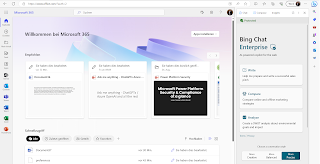
Now Bing Chat Enterprise can be used for all apps that are used in the browser.

The two features Chat and Compose are available for this. The Compose function offers detailed options to generate texts in the required context and style. Thus, tone, format and the length of the text can be defined. The following example shows the result for the question: "What can you do with SharePoint Online?", with the settings: Tone: Professional, Format: Paragraph and Length: Medium:
With the "Add to site" function, the generated texts can be transferred to the Office Online apps Word, Excel, PowerPoint, Outlook, Teams, SharePoint, etc. The text is inserted at the cursor position in the app. In the following example, the generated text is inserted directly into the chat in Teams via the "Add to site" button:
The other direction is also available. However, the "Chat" function must be used here. In the following example, the user has opened a mail in Outlook Online and wants to have the text of the mail translated into Spanish. To do this, the text must be highlighted. Next, Bing Chat automatically asks what should happen to the marked text. The user says "Please translate into Spanish" and Bing Chat can do the job.
To make this feature available, the "Allow access to any web page or PDF" feature must be enabled in the Bing Chat configuration using " Notification  and App Settings":

Donnerstag, 29. Juni 2023

Azure OpenAI on your own data

With the current previews, the Azure OpenAI services can now also be used for own data. The following example shows the Azure services that are required for this.

Required services:

The following services are required and must be used in combination with each other:

  • Azure OpenAI
  • Azure Cognitive Search Index

As of June 2023, Azure OpenAI is still in preview and you need to sign up for the preview to use the features. Azure Cognitive Search is available by default.

Azure Cognitiv Search

First, an instance of Azure Cognitive Search needs to be provisioned. How to do this is described here: Create an Azure Cognitive Search service in the portal.

The next step is to configure where the data that should be indexed is located. There are various options for this, all of them results in an index in the newly created Azure Cognitive Search instance. On the Overview page, you will find the link "Connect your data -> Learn more", which provides a good overview of the options:

For testing scenarios, demo data provided by Microsoft can also be used. The "Import" button takes you to the currently available options:
Especially for customers whose data is stored in M365 / SharePoint Online and Teams, the option "SharePoint Online" is very interesting. Currently, this option is still in preview and cannot be used via the UI. How Azure Cognitive Search can currently be used to index data in SharePoint Online is described here: Index data from SharePoint document libraries.

In my example I use the demo data "hotel-sample" that Microsoft provides:

The index contains the following fields:
These fields can now be used in Azure OpenAI.

Azure OpenAI

As soon as an instant of Azure OpenAI is created / available, the Azure OpenAI Studio is also available. This is where you have the options "ChatGPT-Playground":

In the "ChatGPT-Playground" you can now work either with the data from the general Language Model GPT or with your own data:
To use your own data from the first step "Azure Cognitive Search" you have to select the corresponding details:

The "Index data field mapping" in the next step is optional, but recommended because it increases the quality of the answers significantly. In the example with the "hotel-sample" demo data it looks like this:
This can then be used to generate texts based on GPT and the associated data.
Example:

Do we still need metadata when using Azure OpenAI?

Answer: The question is asked incorrectly. The question should be: Does AI have access to all relevant information. This includes metadata. The example shows the problem. Azure OpenAI does not know the information even it is there.


Mittwoch, 14. Juni 2023

Podcast on the topic of Next Level AI

I was part of two podcasts with Torben Blankertz and Michael Greth on the topic of Next Level AI.

Here are the links to the podcasts:

Einführen von Microsoft Copilot, ChatGPT und AI – mit Nicki Borell:

LINK: https://podcast.blankertz-pm.de/069-einfuehren-von-microsoft-copilot-chatgpt-und-ai-mit-nicki-borell/ 


MikeOnAI DerTalk - S01E02 mit Nicki Borell

LINK: https://youtu.be/vMVmIAL8I5k


Mittwoch, 7. Juni 2023

Next Level AI

Writing assistance, code generation, and conclusions over data - How machine learning and artificial intelligence generate and understand natural language.

The whitepaper by Dr. Michel Rath and Nicki Borell explains the current state of technology, what OpenAI and Microsoft are doing, and how interested customers can benefit from it.

The first part covers the architecture and technical details of Generative Pre-trained Transformers, or GPT for short. It covers basic concepts such as LLM's - (Large Language Model) and what a Prompt is. The whitepaper explains the difference between OpenAI, Azure OpenAI and the announced Microsoft Copilot feature.

Details:

  • Introducing ChatGPT
  • Basic terms
    • LLM
    • Prompt
  • GPT3, GPT4 and other models
  • The cooperation between Open AI and Microsoft
    • Microsoft Copilot
    • What is the difference between Microsoft Copilot and Microsoft OpenAI
  • Current state of technology - what is available, what is announced?
The second part deals with the legal aspects of the topic. How to create a guideline for employees while respecting the protection of company secrets and what needs to be considered when using ChatGPT with an eye on copyright.

Details:

  • Legal Aspects related to ChatGPT & Co.
    • ChatGPT and data protection
    • Guidelines for employees and the protection of trade secrets
    • ChatGPT and Copyright
    • The AI Regulation is coming

Download

  • Download German version: LINK
  • Download English version: LINK

Authors


Dr.Michael Rath is a lawyer, a specialist in information technology law and a partner at Luther Rechtsanwaltsgesellschaft mbH, based in Cologne. He coordinates Luther's Information Tech & Ccommunications practice area. He is also a Certified ISO/IEC 27001 Lead Auditor.


Nicki Borell is co-founder of Experts Inside, a technology consultancy focused on Azure and Microsoft 365, and the head behind the label "Xperts At Work". His focus topics are enterprise collaboration, security and compliance. The Azure OpenAI services and the GPT language model therefore fit perfectly into his work context. They build another integartion between Microsoft 365  and Microsoft's Azure services. Content generation and semantic search are thus also possible for the data within a Microsoft 365 environment in a secure and controllable way.

Mittwoch, 29. März 2023

Introducing Microsoft Security Copilot

Converting questions into actions

Key Functions:

  • Simplify the complex 
  • Catch what others miss 
  • Address the talent gap

Ask Security Copilot questions in natural language and get actionable answers.

Microsoft Security Copilot combines a Large Language Model (LLM) with a Microsoft security-specific model.

When Security Copilot receives a question from a security expert, it uses a security-specific language model to provide answers that can help assess and resolve the incident:

In doing so, the Microsoft Security Copilot response leads to a higher quality of detection and reduces the time needed to resolve the problem:
The solution is thus a kind of SOC as a Service powed by AI.

Security Copilot is a learning system, which means it is continuously improving. Users can directly provide feedback on the answers and solutions suggested by Security Copilot via the integrated interface. The Security Copilot is also able to prepare and report / document incidents:


Donnerstag, 2. März 2023

Anonymize your Microsoft 365 reports

The topic of data protection in the context of Microsoft 365 is still ongoing and not finally clarified in all details. The handling of user information and reports is not only a point from the GDPR. Other audits and ISO standards also address this point. For this reason, Microsoft 365 has been offering the option to output anonymous user names in reports instead of the actual user names. Settings -> Org Settings -> Services -> Reports:

By default, the function is active and the reports are anonymized. However, the actual log data is not changed, but the data in the reports is displayed anonymized, depending on the setting. The anonymization can thus be switched on or off and the user data in the reports change ahock: 

The setting affects the following reports in Microsoft 365:
  • Email Activity
  • Mailbox Activity
  • OneDrive files
  • SharePoint Activity
  • SharePoint Site Usage
  • Microsoft Teams Activity
  • Yammer Activity
  • Active users in Microsoft 365 Services and Apps
  • Groups Activity

Donnerstag, 22. Dezember 2022

Microsoft 365 and the DSK (German Data Protection Conference)


First of all and very important: I, the author, am not a lawyer and have no legal qualification. This article summarizes the facts on the topic of "Can Microsoft Online Services be used in a privacy-compliant manner following the GDPR?

What is it actually about?

Ulrich Kelber, Chairman of the DSK (German Data Protection Conference), said at a press conference on November 24, 2022, that the use of Microsoft 365 remains contrary to data protection.
Reason, among others: It was still unclear which data was collected, transferred and processed for Microsoft's own purposes.

In summary, the lack of transparency is the cause of concern for the DSK.

The DSK doubts that Microsoft 365 can be used in a data protection-compliant manner "...just like that on a computer without further protective measures". The protection that is meant here refers to the so-called perimeter security. The DSK admits that data protection-compliant use is perhaps possible if techniques such as proxy servers or micro-virtualization are used. On a central proxy server, over which all data traffic is routed, the data flow can then be monitored and controlled in detail.
This approach is not new, but is increasingly being replaced by zero trust architectures because it is simply no longer up to date. In addition, cloud providers generally require that data traffic/access to SaaS, IaaS and PaaS services is direct, i.e., that there is no proxy server or techniques such as packet inspection in between.

Example Microsoft:
  • „…Microsoft 365 networking is to optimize the end user experience by enabling the least restrictive access between clients and the closest Microsoft 365 endpoints…“
  • https://learn.microsoft.com/en-us/microsoft-365/enterprise/microsoft-365-networking-overview 
Example AWS:
  • „…To connect to your WorkSpaces, the network that your WorkSpaces clients are connected to must have certain ports open to the IP address ranges for the various AWS services…“
  • https://docs.aws.amazon.com/general/latest/gr/aws-ip-ranges.html 

Options of the customer

The customer itself is not in a able to setup the transparency required by the DSK or to technically influence which data is processed by the contract data processors (Microsoft, AWS, Google, Salesforce, etc.).

In the Microsoft cloud services, the customer can only partially influence the "transparency" by using the Double Key Encryption technology.

However, this does not apply to all types of personal data. For example, it cannot be used to encrypt user data in Azure AD. The "Bring your Own Key" technology, which then also affects tenant encryption as a whole, requires that the own key is uploaded to a Key Vault in Azure. This key is then also stored in the Microsoft Cloud and Microsoft therefore has access to it, at least technically. For details see: Service encryption with Microsoft Purview Customer Key

So what to do?

The DSK…

The DSK (German Data Protection Conference) is a committee of the independent data protection authorities of the German government and the German Federal States. Its focus is on compliance with data protection in the non-public sector. The opinions and guidance published by the DSK are based on the data protection laws of Germany and the German Federal States.
Its focus is on compliance with data protection in the non-public sector. The opinions and guidance provided by the conference are not legally binding. However, they have a de facto impact on the future of data privacy in Germany due to the expertise and authority of the conference members.

DSK says about the use of M365...

...data controllers must be in a position at all times to meet their accountability obligations under Article 5 (2) GDPR. When using Microsoft 365, difficulties can still be expected in this regard on the basis of the "data protection supplement", as Microsoft does not fully disclose which processing operations take place in detail. In addition, Microsoft does not fully disclose which processing operations take place on behalf of the customer or which take place for its own purposes. The contract documents are not precise in this respect and, as a result, do not permit conclusively assessable, possibly even extensive processing also for the customer's own purposes...

Microsoft says this...

… We respectfully disagree with the DSK position as we ensure that our M365 products not only meet, but often exceed, the strong data privacy laws in the European Union. Our customers in Germany and across the EU can confidently use the M365 products in a legally compliant way…

What now?

From the customer's perspective, this is a tricky situation. On the one hand, an institution whose statements are not binding, but are weighty, said NO to M365 for German customers. On the other hand, Microsoft says, "Our customers in Germany and throughout the EU can continue to use M365 products without hesitation and in a legally secure manner.
All in all, the following wording sums it up perfectly for now:
The statement of the DSK is nothing more and nothing less than the legal opinion of a committee of the executive authority. This is not binding. The judiciary, i.e. the German and European courts, has the final word

Or to put it in the words from the Microsoft article:
We look forward to the new framework becoming the basis for a positive European Commission adequacy decision under the GDPR in 2023.